Free Shipping for all orders for delivery within the UAE
EID AL ADHA SALE 🚨 SELLOUT RISK: HIGH 🚨

THINKWARE T700 LTE
No product
4G LTE Connectivity Assured
THINKWARE CONNECTED LTE App (Android/iOS) | THINKWARE DASH CAM LINK App (Android/iOS) 1080p Full HD 2-Channel | Super Night Vision | Energy Saving Mode | Time Lapse | Safety Camera Alert | Road Safety Warning System (LDWS, FCWS, uFCWS, FVDW) 140° Wide Viewing Angle | Built-in Wi-Fi | Built-in GPS | Windows/Mac Viewer
THINKWARE CONNECTED LTE
* Compatible with Android (7.0 Nougat or higher) and iOS (11.4 or higher)
A smarter connected experience with 4G LTE Connectivity.
Depending on the mobile carrier, a standard data plan is included for Thinkware Connected LTE compatible dash cams.
*This standard data plan policy may not apply to your country.
Thinkware Connected LTE, our new and improved mobile app offers a wide range of smart features. Now you can truly communicate with your vehicle in real-time seamlessly.
Receive impact notifications, play videos (strong impact crash in continuous recording mode, parking impact), view captured image of most recent parking, and monitor your vehicle status and driving history on your mobile.
*One account on Thinkware Connected LTE can connect up to five dash cam devices.


Road Safety Warning System
(LDWs, FCWs)

Safety Camera Alert

1080p
Full HD 30fps

LTE & WiFi
(iOS & Android App)

2.19M Pixels
1/2.9"
Energy Saving
Mode


Built-In
GPS

Advanced Video Clear
Technology
REMOTE LIVE VIEW
Remotely view your vehicle in both Continuous Recording Mode and Parking Mode.
Click on Live View button on your smartphone app to view a real-time video of your vehicle.
*Remote Live View can be requested up to 30 minutes a month on the standard data plan.
**Remote Live View is unavailable in Energy Saving Mode when your vehicle is parked.


REAL-TIME PARKING IMPACT VIDEO
In Parking Mode, you can immediately detect an impact with the dash cam.
Receive impact notification and play video of the impact on your smartphone.
Upon user consent, a 20 seconds Full-HD video (10 seconds before and after the incident) is uploaded on the server.
CAPTURED IMAGE OF MOST RECENT PARKING
In Parking Mode, check the location of your vehicle and its surroundings.
View a Full-HD image of your front camera including the location of your parked vehicle.


VEHICLE STATUS AND DRIVING HISTORY
Monitor your vehicle’s status to check whether your vehicle is parked or operating on the road.
Check your vehicle battery voltage and remotely turn off the dash cam when the battery voltage is low.
View your driving history including data such as date, time, distance, route and driving behavior.
REMOTE FIRMWARE DATA UPDATE
Update your dash cam remotely to enhance your dash cam’s features, maintain optimal operation and increase stability.
Conveniently upgrade your firmware and speed cam data to the latest version on your smartphone.
Firmware download can take up to several minutes and you will receive a push notification once the download is complete.
Check the firmware download and reboot the dash cam to start firmware update.


REMOTE FIRMWARE DATA UPDATE
In case of emergency situations, register the contact details of your family, friend or associate.
A SOS message will be transmitted to your emergency contact in the event of a strong impact crash
or when the driver presses the SOS button on the dash cam to urgently request for help.
Strong impact crash message includes a 20 seconds video (10 seconds before and after the incident) and location of the crash.
SOS recording message includes a 10 seconds video (5 seconds before and after the incident) and location of the crash.
* No new videos can be recorded while saving the 20 seconds of first impact file.
** If a second or third impact is detected, an additional push notification alert of the impact is sent to the user’s smartphone. And if those impacts are within 10 seconds from the first impact, it can be seen in the remaining seconds of the first impact file (e.g. If, a second impact is detected 2 seconds from the first impact, 8 seconds are the duration of the second impact video).
*** Strong impact videos are recorded for 20 seconds (10 second before and after the incident) at 30 frames per second. The videos are uploaded on to the server and your emergency contact will receive an SMS message including the impact details and video URL. The strong impact notification, strong impact video upload and transmission to emergency contact is an unlimited service.
**** The service behavior and the transmission may vary depending on the server environment and your mobile data.
THINKWARE DASH CAM LINK
*Compatible with Android (7.0 Nougat or higher) and iOS (11.4 or higher)

PLAY RECORDED VIDEOS AND
MANAGE SETTINGS ON SMARTPHONE
The Thinkware Dash Cam T700 and your smartphone can be connected via
‘THINKWARE DASH CAM LINK’ app with built-in Wi-Fi. Check live view screen, play recorded videos, and manage dash cam settings.

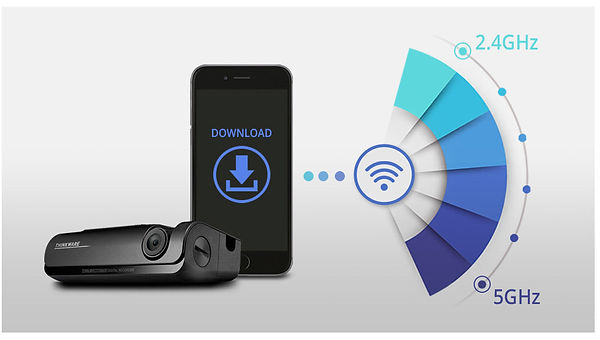
QUICK DOWNLOADS VIA BUILT-IN WI-FI
Wi-Fi connectivity supports both 2.4GHz and 5GHz bands for the best experience in different environments.
2.4GHz has a longer range and can be captured from a farther distance
The longer range network also captures other devices thus preferred in undisrupted environments.
5GHz has a shorter range and can offer better performance with a higher bandwidth.
The shorter range network avoids interferences thus preferred for a less congestive experience within shorter distances.
*Download speed and connection experience can differ according to smartphone specifications and telecommunications conditions.
**5GHz band may be more suitable for cities in Singapore or Hong Kong due to possible disruptions in telecommunications environments.
SUPER NIGHT VISION
Dash cam videos recorded in a low-light environment, such as dark alleys or parking lots, may not be clearly identifiable.
Super Night Vision uses Image Signal Processing (ISP) technology to record clear and visible videos in Parking Mode.

ENERGY SAVING MODE
Energy Saving Mode will reduce power consumption by 1/3 less and give 3x longer video recording than normal parking mode. When you are away for a vacation or leaving your car for quite some time, Energy Saving Mode is a recommended solution.
The Thinkware Dash Cam T700 will go to sleep in Energy Saving Mode. Soon after an impact has been detected by a built-in G-sensor, the dash cam will wake up within a second and start recording for next 20 seconds of period.

TIME LAPSE
Important clips and images may get deleted due to insufficient memory space during long continuous recordings, especially in standard parking recording mode which requires large memory for saving 15 to 30 frames per second.
Time Lapse Mode records 2 frames per second reducing the size of the video file. This allows video recordings in parking mode to continue up to 16 times longer than other dash cams. Parking Mode can be activated upon installing the Thinkware Dash Cam T700 with hardwiring cable.
